Twisted bilayer graphene structural relaxation
In a twisted graphene bilayer the local stacking changes along the moiré
pattern, between AA regions, where the atoms of the two layers are on top of
each other, and AB and BA (Bernal) regions. AA stacking costs more energy
than AB and BA. So for small twist angles, below a few degrees, the real
lattice does not stay rigid: the atoms move in the plane, the AA regions
shrink, and triangular AB and BA domains grow, separated by domain walls.
This relaxation changes the band structure, so it should be included before
the electronic structure is computed. We do this with GrapheneGeometry and
its method .relax().
The energy that is minimized
.relax() finds the in-plane displacement \(\mathbf u\) of each atom that
minimizes the sum of two energies, with the parameters of Carr, Massatt,
Torrisi, Cazeaux, Luskin and Kaxiras,
arXiv:1805.06972.
The first one is the interlayer energy, the generalized stacking fault energy. It depends on the local shift between the two layers, written as two phases \((v,w)\), so that it is periodic in the shift:
per unit cell, with \(c_0=6.832\), \(c_1=4.064\), \(c_2=-0.374\) and \(c_3=-0.095\) meV. AA stacking is its maximum, and AB and BA are its two degenerate minima.
The second one is the elastic energy of each layer, which is the cost of deforming it,
per unit cell, with \(G=69518\) meV and \(K=47352\) meV. The first term is the cost of a change of area, the second one the cost of a shear. The atoms only move in the plane; corrugation out of the plane is not included.
The result is a balance between the two: the interlayer energy wants large AB and BA domains, and the elastic energy wants a smooth displacement. For small angles the moiré cell is large, so the domains can grow while the deformation stays smooth, and the relaxation is strong.
The electronic structure of the relaxed lattice
GrapheneHamiltonian builds the tight-binding Hamiltonian from a relaxed or
a rigid GrapheneGeometry. Its hopping between two sites depends on their
distance \(r\) in three dimensions,
where \(r_\parallel\) and \(r_z\) are the in-plane and out-of-plane parts of
\(\mathbf r\). The first term is the in-plane hopping, \(t=1\), and the second
one the interlayer hopping, \(t_\perp=0.12\), with an interlayer distance
\(d=3\) in units of the carbon-carbon distance. Note that the hopping here is
\(-t\), the opposite sign of the \(+1\) of g.get_hamiltonian(), so the bands
of the two Hamiltonians are mirrored in energy. Because the hoppings depend on
the real distances, the relaxed positions change the electronic structure
without any other change.
from pyqula import specialgeometry
from pyqula.graphenetk.geometry import GrapheneGeometry
from pyqula.graphenetk.hamiltonian import GrapheneHamiltonian

g0 = specialgeometry.twisted_bilayer(m0=15) # ~2 degree twist
g = GrapheneGeometry(g0).relax() # AA area shrinks, AB/BA domains grow
h = GrapheneHamiltonian(g)
(k,e) = h.get_bands(num_bands=20)
.relax() returns a new geometry and does not change the rigid one, so you
can compare the two. GrapheneGeometry works for any graphene multilayer
(bilayer, twisted bilayer, twisted trilayer). The relaxation is stronger for
smaller twist angles. The band structure of the relaxed lattice is the one
to compare with an experiment on a real sample, for example with ARPES or
with the local density of states measured by STM. The relaxation takes a
few seconds, while h.get_bands(num_bands=20) on the 2884 atoms of this
moiré cell takes several minutes, about 8 on a laptop.
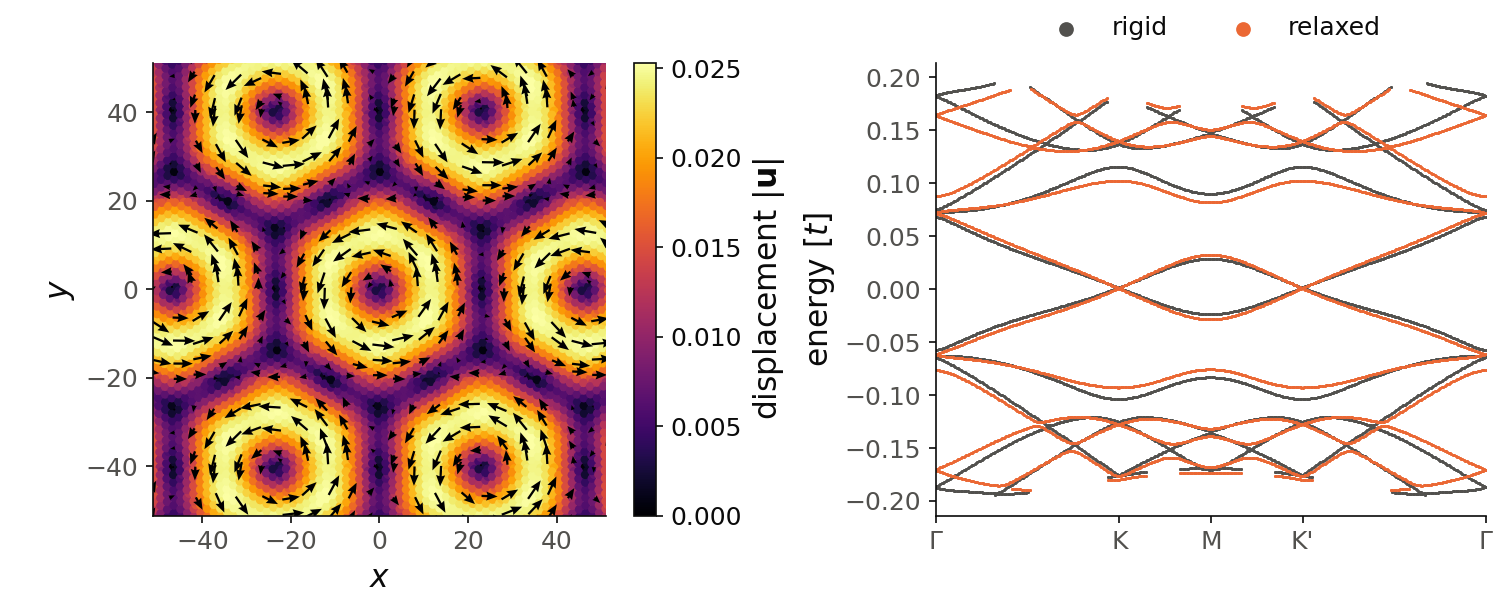
The left panel shows the displacement \(\mathbf u\) of the atoms of the top
layer, the difference between the positions of g and of g0, over several
moiré cells. The atoms turn around each AA region (the dark centres of the
rings, at the origin and at its copies by the moiré lattice vectors), and
the bottom layer turns in the opposite direction. The displacement is zero
at AA and at the centres of the AB and BA domains (the dark points between
the rings), and it is largest, 0.025 in units of the carbon-carbon distance,
on a ring around AA. So the relaxation is mostly a local rotation of the two
layers around each AA region.
The right panel shows the bands of the relaxed lattice (orange) and, as a
reference, of the rigid one (gray), with the default nk=400 points on the
k-path, as in the snippet. The two bands
closest to zero energy are the central bands of the moiré, with their Dirac
points at K and K'. The relaxation changes them by about 0.004 in units of
the hopping: at M they go from \(-0.024\) and \(0.029\) to \(-0.028\) and \(0.033\), and
the levels closest to zero at \(\Gamma\) go from \(-0.057\) and \(0.068\) to \(-0.062\)
and \(0.072\). The next bands come closer to the central ones: at M they go from
\(-0.083\) and \(0.090\) to \(-0.076\) and \(0.082\).
Code of this figure (documentation/figures/relaxation_twisted.py)
import numpy as np
import style
from pyqula import specialgeometry
from pyqula.graphenetk.geometry import GrapheneGeometry
from pyqula.graphenetk.hamiltonian import GrapheneHamiltonian

g0 = specialgeometry.twisted_bilayer(m0=15) # ~2 degree twist
g = GrapheneGeometry(g0).relax() # AA area shrinks, AB/BA domains grow
h = GrapheneHamiltonian(g)
(k,e) = h.get_bands(num_bands=20)
h0 = GrapheneHamiltonian(GrapheneGeometry(g0)) # the rigid lattice, as a reference
(k0,e0) = h0.get_bands(num_bands=20)

u = g.r - g0.r # in-plane displacement of each atom
top = g0.r[:,2] > 0 # atoms of the top layer

def draw(ax, c):
    cells = [(i,j) for i in range(-2,3) for j in range(-2,3)] # 5x5 moire cells
    r = np.concatenate([g0.r[top] + i*g0.a1 + j*g0.a2 for (i,j) in cells])
    du = np.concatenate([u[top] for (i,j) in cells])
    umod = np.sqrt(du[:,0]**2 + du[:,1]**2)
    sc = ax[0].scatter(r[:,0], r[:,1], c=umod, s=10, cmap=c.cmap, vmin=0)
    style.colorbar(sc, ax[0], "displacement $|\\mathbf{u}|$")
    q = np.unique(np.round(r[:,:2]/5.), axis=0, return_index=True)[1] # one arrow per 5x5 area
    ax[0].quiver(r[q,0], r[q,1], du[q,0], du[q,1], color="black", scale=0.005,
                 scale_units="xy", width=0.005, headwidth=4)
    L = 1.1*np.linalg.norm(g0.a1)
    ax[0].set_xlim(-L, L) ; ax[0].set_ylim(-L, L) ; ax[0].set_aspect("equal")
    ax[0].set_xlabel("$x$") ; ax[0].set_ylabel("$y$")
    ax[1].scatter(k0, e0, s=2, color=c.ink2, lw=0, label="rigid")
    ax[1].scatter(k, e, s=2, color=c.orange, lw=0, label="relaxed")
    ticks = np.array([0, 1/3, 1/2, 2/3, 1])*max(k) # the path goes through K, M and K'
    ax[1].set_xticks(ticks, [r"$\Gamma$", "K", "M", "K'", r"$\Gamma$"])
    ax[1].set_xlim(0, max(k))
    ax[1].set_ylabel("energy [$t$]")
    ax[1].legend(loc="lower center", bbox_to_anchor=(0.5, 1.0), ncol=2,
                 markerscale=5)

style.save(draw, "relaxation_twisted", npanels=2)
See examples/2d/graphene_relax/main.py for a runnable script that compares
the rigid and the relaxed lattices, and
jupyter-notebooks/functionalities/single_particle_hamiltonians/10_twisted_bilayer_relaxation.ipynb
for an executed notebook.