Building a Hamiltonian
Every calculation in pyqula follows the same steps. We build a geometry, we generate a tight-binding Hamiltonian from it, we add terms to this Hamiltonian, and we compute a quantity from it. In this page we see the first two steps, and the simplest terms: longer-range hopping, an onsite energy, a Zeeman field, an orbital magnetic field and a filling.
The first-neighbor chain
The simplest tight-binding model is a one-dimensional chain with hopping between first neighbors,
where \(c^\dagger_n\) creates an electron at site \(n\). The term \(c^\dagger_n c_{n+1}\) moves an electron from site \(n+1\) to site \(n\), and the second term moves it back. In pyqula the hopping is the unit of energy, \(t=1\), and the distance between first neighbors is the unit of length. The Hamiltonian is diagonal in momentum,
so the chain has a single band of width \(4t\). With pyqula:
from pyqula import geometry
g = geometry.chain() # geometry of the 1D chain
h = g.get_hamiltonian() # generate the Hamiltonian
(k,e) = h.get_bands() # compute band structure
The geometry g contains the positions of the sites and the lattice
vectors. g.get_hamiltonian() generates the Hamiltonian with first-neighbor
hopping \(t=1\). h.get_bands() returns the k-points along a path and the
energies at each k-point, here the cosine band \(\epsilon_k=2\cos k\).
The Hamiltonian is spinful by default, so every band appears twice, once for
each spin. A spinless Hamiltonian is generated with
g.get_hamiltonian(has_spin=False). All the methods that add a term are
called h.add_...(), and they change h in place, so a calculation is a
sequence of calls on the same object. If you want to keep the original
Hamiltonian, make a copy first with h.copy().
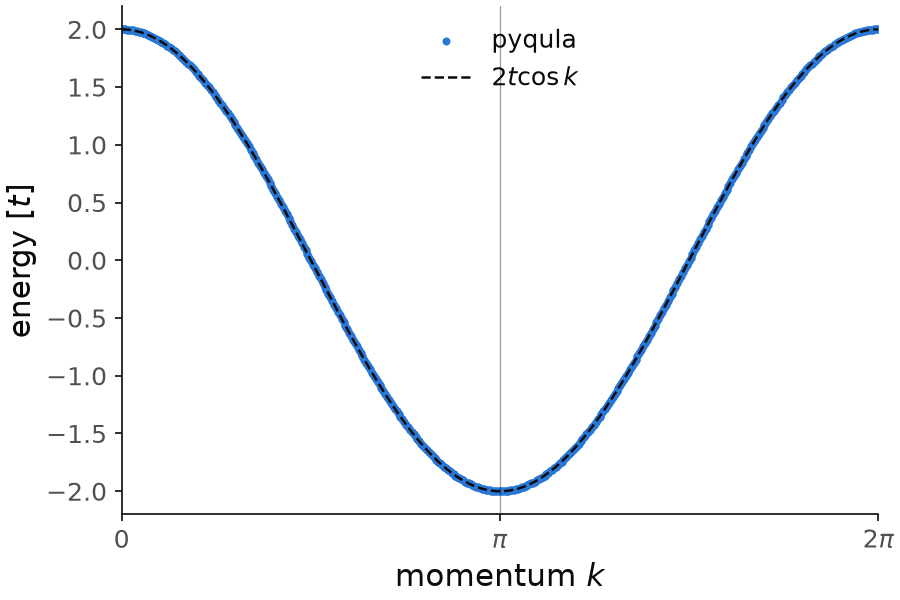
The computed energies (dots) lie on the cosine \(2t\cos k\) (dashed line). The band goes from \(-2t\) at \(k=\pi\) to \(2t\) at \(k=0\), so its width is \(4t\).
Code of this figure (documentation/figures/hamiltonian_chain.py)
import numpy as np
import style
from pyqula import geometry

g = geometry.chain() # geometry of the 1D chain
h = g.get_hamiltonian() # generate the Hamiltonian
(k,e) = h.get_bands() # compute band structure
k = 2*np.pi*k/k.max() # the k-path goes from 0 to 2 pi

def draw(ax, c):
    ax.scatter(k, e, s=8, color=c.blue, label="pyqula")
    ax.plot(k, 2*np.cos(k), "--", color=c.ink, lw=1.2, label=r"$2t\cos k$")
    style.kpath(ax, k, ["0", r"$\pi$", r"$2\pi$"])
    ax.set_xlabel("momentum $k$")
    ax.set_ylabel("energy [$t$]")
    ax.legend(loc="upper center")

style.save(draw, "hamiltonian_chain")
See examples/1d/linear_chain/main.py for a runnable script, and
jupyter-notebooks/functionalities/single_particle_hamiltonians/ for
spinless, spinful and Nambu Hamiltonians in zero to three dimensions.
Second and third neighbor hopping
We now add hopping to sites further away. The Hamiltonian is
where \(t_2\) and \(t_3\) are the second- and third-neighbor hoppings, in units
of the first-neighbor one. The list of hoppings is given to
g.get_hamiltonian(), first neighbor first. For \(t_2=0.2\) and \(t_3=0.3\):
from pyqula import geometry
g = geometry.chain() # geometry of the 1D chain
h = g.get_hamiltonian(tij=[1.0,0.2,0.3]) # Hamiltonian with t1,t2,t3
(k,e) = h.get_bands() # compute band structure
The dispersion is now
In the band structure you see that the band is not symmetric anymore
between positive and negative energies. The reason is the second-neighbor
hopping: it connects two sites of the same sublattice, so it breaks the
chiral (sublattice) symmetry \(\epsilon_k \to -\epsilon_{k+\pi}\), while the
first- and third-neighbor hoppings keep it. The same list works for any
lattice. Instead of a list, tij can also be a function of the two
positions; see g.get_hamiltonian() in the
Geometry reference.
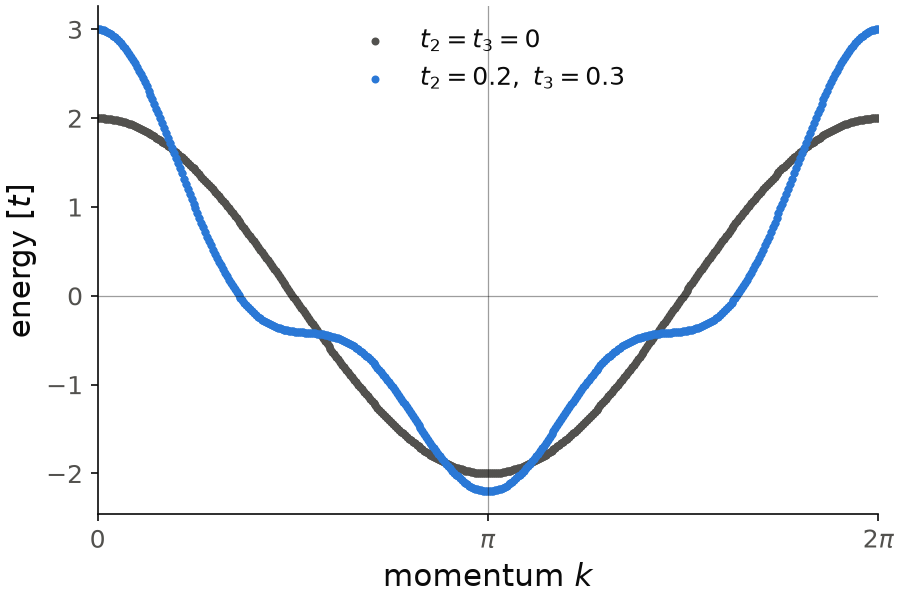
With \(t_2=0.2\) and \(t_3=0.3\) the band goes up to \(3t\) at \(k=0\) and down to \(-2.2t\) at \(k=\pi\), so it is not symmetric around zero energy anymore. The first-neighbor band (gray) is shown as a reference.
Code of this figure (documentation/figures/hamiltonian_longrange.py)
import numpy as np
import style
from pyqula import geometry

g = geometry.chain() # geometry of the 1D chain
h1 = g.get_hamiltonian() # first-neighbor hopping only
h = g.get_hamiltonian(tij=[1.0,0.2,0.3]) # Hamiltonian with t1,t2,t3
(k,e1) = h1.get_bands()
(k,e) = h.get_bands() # compute band structure
k = 2*np.pi*k/k.max() # the k-path goes from 0 to 2 pi

def draw(ax, c):
    ax.scatter(k, e1, s=8, color=c.ink2, label=r"$t_2=t_3=0$")
    ax.scatter(k, e, s=8, color=c.blue, label=r"$t_2=0.2,\ t_3=0.3$")
    ax.axhline(0, color=c.ink, lw=0.6, alpha=0.4)
    style.kpath(ax, k, ["0", r"$\pi$", r"$2\pi$"])
    ax.set_xlabel("momentum $k$")
    ax.set_ylabel("energy [$t$]")
    ax.legend(loc="upper center")

style.save(draw, "hamiltonian_longrange")
See examples/1d/NNN_chain/main.py for a runnable script.
Onsite energy
An onsite energy changes the energy of an electron on a site, without moving it. With the same value \(\mu\) on every site, it is a chemical potential,
and it shifts the whole band structure rigidly by \(\mu\). All the observables
in pyqula take zero energy as the Fermi energy, so adding a uniform onsite
energy is the way to move the Fermi energy. It is added with
h.add_onsite():
from pyqula import geometry
g = geometry.chain() # geometry of the 1D chain
h = g.get_hamiltonian() # generate the Hamiltonian
mu = 0.3 # value of the onsite
h.add_onsite(mu) # add onsite energy
The argument can be
- a float: the same onsite energy on every site.
- a list or array: one onsite energy per site of the geometry.
- a function of the position \(\mathbf r\): the onsite energy of each site is the function evaluated at its position.
A site-dependent onsite energy is how we build a potential: a sublattice imbalance in the honeycomb lattice, which opens a gap at the Dirac points; a single impurity, with a large onsite energy on one site (see Quasiparticle interference); or a smooth electrostatic potential from a gate.
Zeeman field
We now add an external magnetic field that acts on the spin of the
electrons, with h.add_zeeman(). The Hamiltonian is \(H = H_0 + H_Z\), with
where \(n\) runs over the sites, \(s,s'\) over the spin, \(\vec B=(B_x,B_y,B_z)\) is the field in units of energy, and \(\vec\sigma\) are the Pauli matrices. The field splits each band into two spin bands separated by \(2|\vec B|\), with the spin parallel and antiparallel to \(\vec B\). For \(\vec B=(0.1,0.2,0.3)\):
from pyqula import geometry
g = geometry.chain() # geometry of the 1D chain
h = g.get_hamiltonian() # generate the Hamiltonian
h.add_zeeman([0.1,0.2,0.3]) # add the Zeeman field (modifies h in place)
(k,e) = h.get_bands() # compute band structure
In the band structure, the two copies of the cosine band are now shifted by \(\pm|\vec B| = \pm 0.37\). If the Hamiltonian is spinless, the call first makes it spinful. The field can also change from site to site: give one vector per site, or a function of the position.
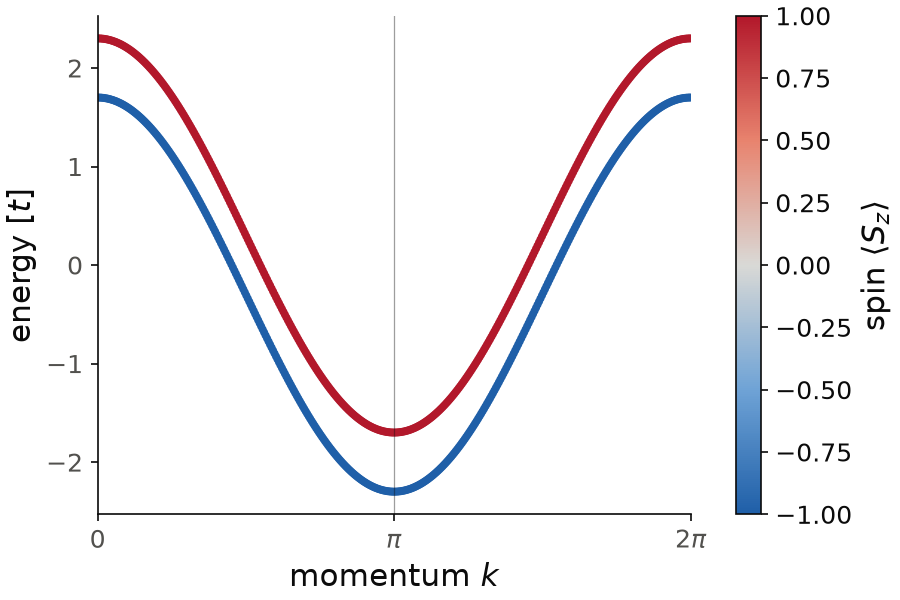
Here the field is along \(z\), \(\vec B=(0,0,0.3)\), so that the color can show \(\langle S_z\rangle\) of each state. The two spin bands are rigid copies of the cosine band, shifted by \(\pm 0.3\). The spin parallel to the field is the higher band, because the term is \(+\vec B\cdot\vec\sigma\).
Code of this figure (documentation/figures/hamiltonian_zeeman.py)
import numpy as np
import style
from pyqula import geometry

g = geometry.chain() # geometry of the 1D chain
h = g.get_hamiltonian() # generate the Hamiltonian
h.add_zeeman([0.,0.,0.3]) # Zeeman field along z
(k,e,sz) = h.get_bands(operator="sz") # bands, and the spin of each state
k = 2*np.pi*k/k.max() # the k-path goes from 0 to 2 pi

def draw(ax, c):
    sc = ax.scatter(k, e, c=sz, s=8, cmap=c.diverging, vmin=-1, vmax=1)
    style.colorbar(sc, ax, r"spin $\langle S_z\rangle$")
    style.kpath(ax, k, ["0", r"$\pi$", r"$2\pi$"])
    ax.set_xlabel("momentum $k$")
    ax.set_ylabel("energy [$t$]")

style.save(draw, "hamiltonian_zeeman")
h.add_exchange() adds exactly the same term. We use the name Zeeman when
the field is external, and exchange when it is the magnetization of the
material itself, for example the one we obtain in
Mean-field Hubbard models.
Orbital magnetic field
A magnetic field also acts on the orbital motion of the electrons. In a tight-binding model this enters as a phase in the hopping, the Peierls substitution,
where \(\vec A\) is the vector potential, \(\vec B = \nabla \times \vec A\), and
the integral goes along the bond. An electron that goes around a closed loop
picks up a phase \(2\pi\Phi/\Phi_0\), with \(\Phi\) the flux through the loop and
\(\Phi_0\) the flux quantum. We apply it to a ribbon, a system finite in one
direction and periodic in the other, with h.add_orbital_magnetic_field():
from pyqula import geometry
N = 20 # number of unit cells as the width
g = geometry.square_ribbon(N) # ribbon
h = g.get_hamiltonian() # generate the Hamiltonian
B = 0.02 # magnetic field in quantum flux unit
h.add_orbital_magnetic_field(B) # add an out-of plane magnetic field
(k,e) = h.get_bands() # compute the Landau-level band structure
B is the flux through a plaquette of unit area, in units of \(\Phi_0\), so
B = 0.02 is one flux quantum every 50 plaquettes. The band structure shows
the quantum Hall effect. There are flat bands, the Landau levels, and the
lowest one is close to \(-4 + 2\pi B\) for the square lattice, since near the
band bottom the electrons behave as free electrons with cyclotron energy
\(4\pi B\). Between the Landau levels there are dispersive bands that cross the
gap: these are the chiral edge states, one at each edge of the ribbon,
moving in opposite directions. Each of them carries one quantum of
conductance \(e^2/h\), which is what a Hall measurement sees. For a honeycomb
ribbon the same call gives the Landau levels of a Dirac equation, with one
level at zero energy.
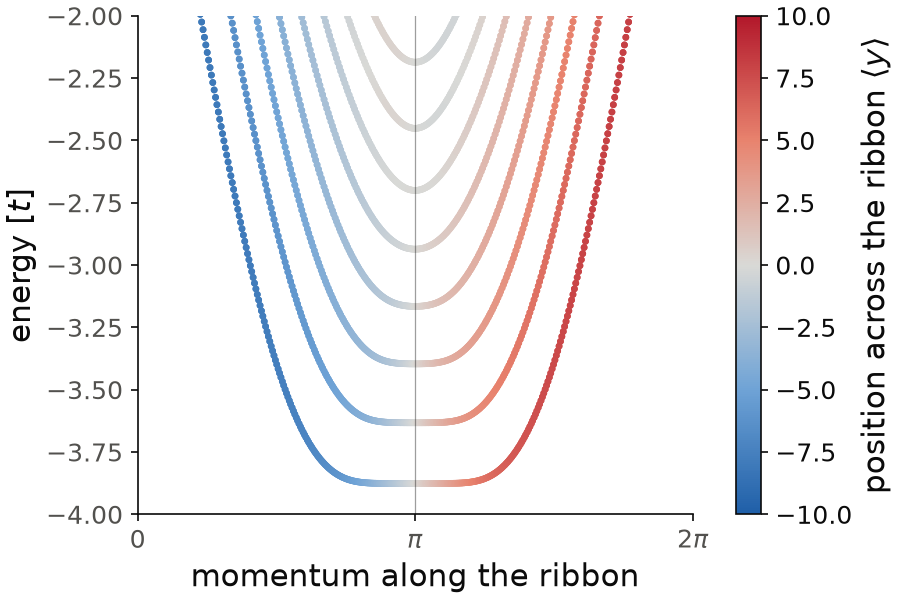
The color is the position of each state across the ribbon, computed with
h.get_bands(operator="yposition"). In the middle of the k-path the bands are
flat and white: these are the Landau levels, in the bulk of the ribbon. The
lowest one is at \(-3.87\), close to \(-4+2\pi B=-3.87\). Away from the middle
the levels disperse and turn red or blue: they become edge states, localized
at one edge or the other, and moving in opposite directions.
Code of this figure (documentation/figures/hamiltonian_landau.py)
import style
from pyqula import geometry

N = 20 # number of unit cells as the width
g = geometry.square_ribbon(N) # ribbon
h = g.get_hamiltonian() # generate the Hamiltonian
B = 0.02 # magnetic field in quantum flux unit
h.add_orbital_magnetic_field(B) # add an out-of plane magnetic field
(k,e,y) = h.get_bands(operator="yposition") # bands, and position of each state

def draw(ax, c):
    sc = ax.scatter(k, e, c=y, s=5, cmap=c.diverging, vmin=-N/2, vmax=N/2)
    style.colorbar(sc, ax, r"position across the ribbon $\langle y\rangle$")
    style.kpath(ax, k, ["0", r"$\pi$", r"$2\pi$"])
    ax.set_xlabel("momentum along the ribbon")
    ax.set_ylabel("energy [$t$]")
    ax.set_ylim(-4, -2)

style.save(draw, "hamiltonian_landau")
See examples/1d/landau_levels_zigzag_ribbon/main.py for a runnable script
on a honeycomb ribbon.
Filling
The filling \(\nu\) is the fraction of the states that are occupied,
where the sum goes over all the \(N\) states of the unit cell (sites, and
spins in a spinful system). Half filling is \(\nu=0.5\), and for the
first-neighbor chain it is the case of the Fermi energy at zero. To fix
another filling we use h.set_filling():
from pyqula import geometry
g = geometry.chain() # chain
h = g.get_hamiltonian()
h.set_filling(0.7) # enforce a filling
h.set_filling() finds the Fermi energy \(E_F\) that gives this filling, using
a k-mesh of nk points per direction, and then adds the onsite energy
\(-E_F\). After this, the Fermi energy is at zero, and every observable is
computed at the filling you asked for. For a metal the k-mesh matters,
because the filling changes continuously with \(E_F\). For an insulator any
\(E_F\) inside the gap gives the same filling. The same keyword filling
appears again in h.get_mean_field_hamiltonian(), where the filling is kept
fixed during the self-consistent loop (see
Mean-field Hubbard models).
Sometimes we want a different filling on each site, for example a charge
imbalance between two sublattices, created by a gate or a substrate. One
Fermi energy cannot do this. Instead, we give one filling per site, and
h.set_filling() finds one onsite energy per site so that each site has its
own filling:
import numpy as np
from pyqula import geometry
g = geometry.honeycomb_lattice() # honeycomb lattice, two sites per unit cell
h = g.get_hamiltonian() # first-neighbor Hamiltonian
h.set_filling(np.array([0.4,0.6])) # filling 0.4 on sublattice A, 0.6 on sublattice B
occ = h.get_vev() # occupation of each site
Each number has the same meaning as before, the fraction of the states of
that site that are occupied. In this spinful example a site has two states,
so occ is roughly 0.8 and 1.2 electrons, and the average filling is 0.5. A
single number with average=False gives the same filling on every site,
instead of only on average.
On a finite island the levels are discrete and the number of electrons is an
integer. A set of fillings that gives a fractional number of electrons is
only reached because of the broadening \(\delta=0.01\) that the solver uses,
so in this case the occupations should be read with
h.get_vev(delta=1e-2).