Band structures and density of states
In this page we compute the two basic quantities of a periodic Hamiltonian: the band structure, the energies as a function of momentum, and the density of states, the number of states at each energy. The local, momentum-resolved and surface versions of the density of states are in Local density of states and Spectral functions.
Band structure
For a system that is periodic in space, the momentum \(k\) is a good quantum number, and the Hamiltonian is diagonal in the basis of the Bloch states,
where \(\alpha\) is the band index and \(\epsilon_{k,\alpha}\) is the energy of
band \(\alpha\) at momentum \(k\). So at each \(k\) there is one energy per band.
This is the band structure, the quantity that ARPES measures for the
occupied states. We compute it with h.get_bands():
from pyqula import geometry
g = geometry.honeycomb_lattice() # geometry of the 2D model
h = g.get_hamiltonian() # generate the Hamiltonian
(k,e) = h.get_bands() # compute band structure
h.get_bands() returns two arrays of the same length: the position along the
k-path, and the energy. Each k-point appears once for each band, so the two
arrays together are a scatter plot of the band structure. For the honeycomb
lattice you see two bands that touch at zero energy at the K point, the
Dirac point. Each band extends to \(\pm 3t\).
The keywords are
kpath: the k-path, as a list of high-symmetry points (["G","K","M"]) or of explicit k-vectors. By default, the standard path of the lattice.nk: number of k-points along the path.operator: an operator, or a list of operators, whose expectation value is computed in each eigenstate. The output is then(k,e,c).num_bands: compute only this many bands aroundcentral_energy, for large Hamiltonians.
With an operator \(A\), the third array is
\(\langle \Psi_{k,\alpha}|A|\Psi_{k,\alpha}\rangle\) for each state, and it is
the color of the bands in a plot. For example, the group velocity tells
apart flat bands from dispersive ones, and the spin operator "sz" tells
apart the two spin channels of a magnet, which we use in
Mean-field Hubbard models:
from pyqula import geometry
g = geometry.honeycomb_lattice()
h = g.get_hamiltonian(has_spin=True)
(k,e,c) = h.get_bands(operator="velocity") # bands colored by group velocity
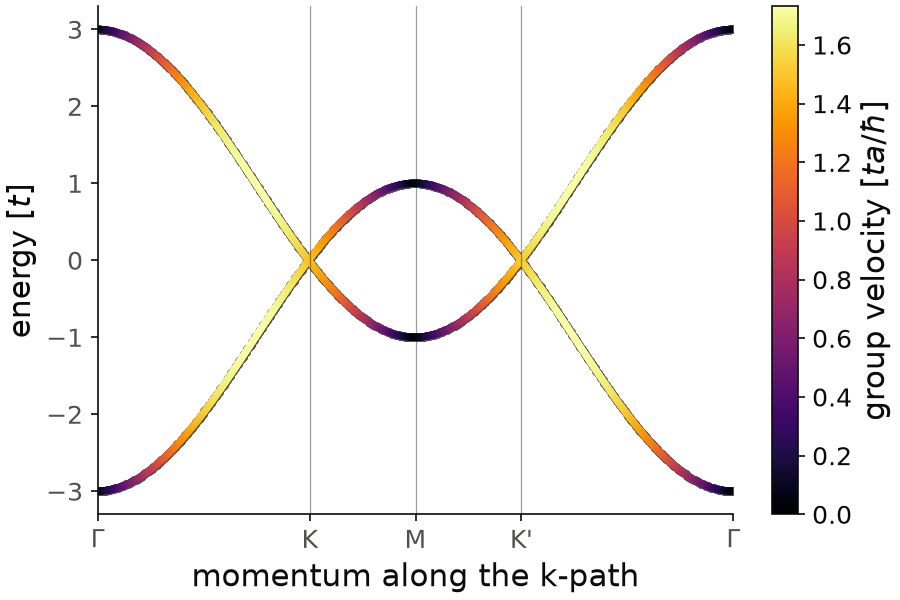
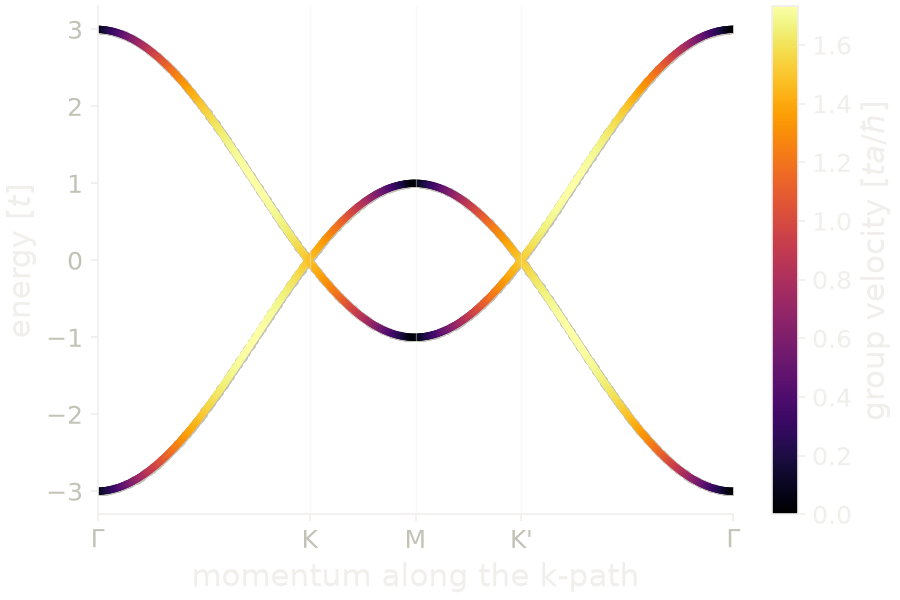
The two bands touch at zero energy at K and K', the Dirac points, and they reach \(\pm 3t\) at \(\Gamma\). The color is the group velocity. At the Dirac points it is \(1.5\,ta/\hbar\), which is \(3ta/2\hbar\), the Dirac velocity of graphene, with \(a\) the first-neighbor distance. It goes to zero at \(\Gamma\) and at M, where the bands are flat. The flat bands at M, at \(\pm t\), are the saddle points that give the van Hove singularities of the density of states.
Code of this figure (documentation/figures/bands_honeycomb.py)
import numpy as np
import style
from pyqula import geometry

g = geometry.honeycomb_lattice()
h = g.get_hamiltonian(has_spin=True)
(k,e,c) = h.get_bands(operator="velocity") # bands colored by group velocity

def draw(ax, c_):
    ax.scatter(k, e, s=10, color=c_.ink2) # outline, so that zero velocity stays visible
    sc = ax.scatter(k, e, c=c, s=6, cmap=c_.cmap, vmin=0)
    style.colorbar(sc, ax, r"group velocity [$ta/\hbar$]")
    style.kpath(ax, k, [r"$\Gamma$", "K", "M", "K'", r"$\Gamma$"], at=[0,1/3,1/2,2/3,1])
    ax.set_xlabel("momentum along the k-path")
    ax.set_ylabel("energy [$t$]")

style.save(draw, "bands_honeycomb")
With a list of operators, the output has one extra array per operator,
(k,e,c1,c2,...):
(k,e,c_sz,c_site) = h.get_bands(operator=["sz","site"]) # two operators at once
The available operators are described in Operators.
For a very large unit cell, for example a moire supercell, we usually only
want a few bands near the Fermi energy. With num_bands, only these bands
are computed, which is much faster than computing all of them:
(k,e) = h.get_bands(num_bands=20) # only the 20 bands closest to central_energy
See examples/2d/velocity_bands/main.py and examples/2d/strain_TBG/main.py
for runnable scripts, and
jupyter-notebooks/functionalities/single_particle_hamiltonians/04_state_resolved_bands.ipynb
for bands colored by an operator.
Density of states
The density of states counts how many states there are at energy \(\omega\),
where \(N_k\) is the number of k-points and
\(G(k,z) = (z - H_k)^{-1}\) is the Green's function. In practice the delta
function is replaced by a Lorentzian of width \(\delta\), the broadening. With
this normalization, the integral of \(D(\omega)\) over all energies is the
number of states per unit cell, for example 2 for a spinful chain. A flat
part of a band gives a peak in \(D(\omega)\), and a saddle point gives a
logarithmic peak, a van Hove singularity. The density of states is what is
measured, averaged over space, by tunneling spectroscopy, and it controls
the specific heat and the Pauli susceptibility. We compute it with
h.get_dos():
from pyqula import geometry
g = geometry.triangular_lattice() # get the geometry
h = g.get_hamiltonian()  # get the Hamiltonian
(es,ds) = h.get_dos()
h.get_dos() returns the energies and \(D(\omega)\) at each energy. By default
the energies go from \(-4\) to \(4\), in units of the hopping. For the triangular
lattice the band goes from \(-3\) to \(6\), so the density of states is not
symmetric. You see a van Hove singularity at \(E=-2\), the energy of the saddle
point at the M point. The top of the band, at \(E=6\), is outside the default
window, so give energies= when you need the whole band.
The keywords are
energies: the energies where \(D(\omega)\) is computed.delta: the broadening \(\delta\). Formode="ED"the default is \(5/\)nk.operator: project the density of states on an operator.mode: how the integral is done:"ED"(default),"Green"(or"RG"),"KPM"or"adaptive".nk: number of k-points per direction of the k-mesh.
The broadening should be larger than the energy spacing that the finite
k-mesh gives, otherwise you see the k-mesh and not the band structure. So a
smaller delta needs a larger nk.
All modes compute the same quantity with the same normalization, and they
differ only in cost. "ED" diagonalizes \(H_k\) on a k-mesh. "Green"
computes the Green's function at each energy, which is cheaper when you need
only a few energies. "KPM" uses an expansion in Chebyshev polynomials and is
the choice for very large systems (see
Kernel polynomial method). "adaptive" integrates over the
Brillouin zone with a quadrature that refines the k-mesh where it is needed,
with a target error error=1e-1. In the example below, a spinful chain with
longer-range hopping and Rashba spin-orbit coupling, the ED and Green's
function results fall on top of each other:
from pyqula import geometry
import numpy as np
g = geometry.chain()
h = g.get_hamiltonian(tij=[0.5,0.,0.,0.5],has_spin=True)
h.add_rashba(0.7)
energies = np.linspace(-4.,4.0,60)
(e1,d1) = h.get_dos(energies=energies,delta=1e-2,mode="ED",nk=1000)
(e2,d2) = h.get_dos(energies=energies,delta=1e-2,mode="Green")
With an operator \(A\), the projected density of states is
For the sublattice operator, which is \(+1\) on sublattice A and \(-1\) on sublattice B, this is the difference between the density of states of the two sublattices. In a honeycomb lattice with a sublattice imbalance, the states below the gap live on one sublattice and the states above it on the other, so \(D_A(\omega)\) has opposite signs on the two sides of the gap:
from pyqula import geometry
g = geometry.honeycomb_lattice()
h = g.get_hamiltonian(has_spin=True)
h.add_sublattice_imbalance(.4)
(es,ds) = h.get_dos(operator="sublattice",nk=200,delta=5e-2)
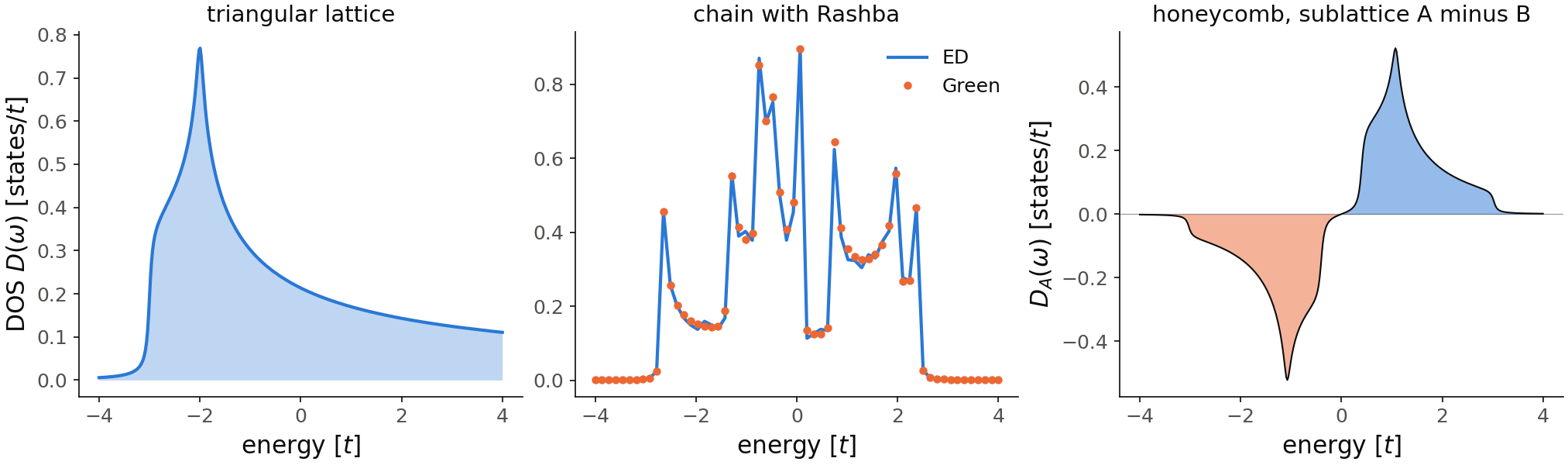
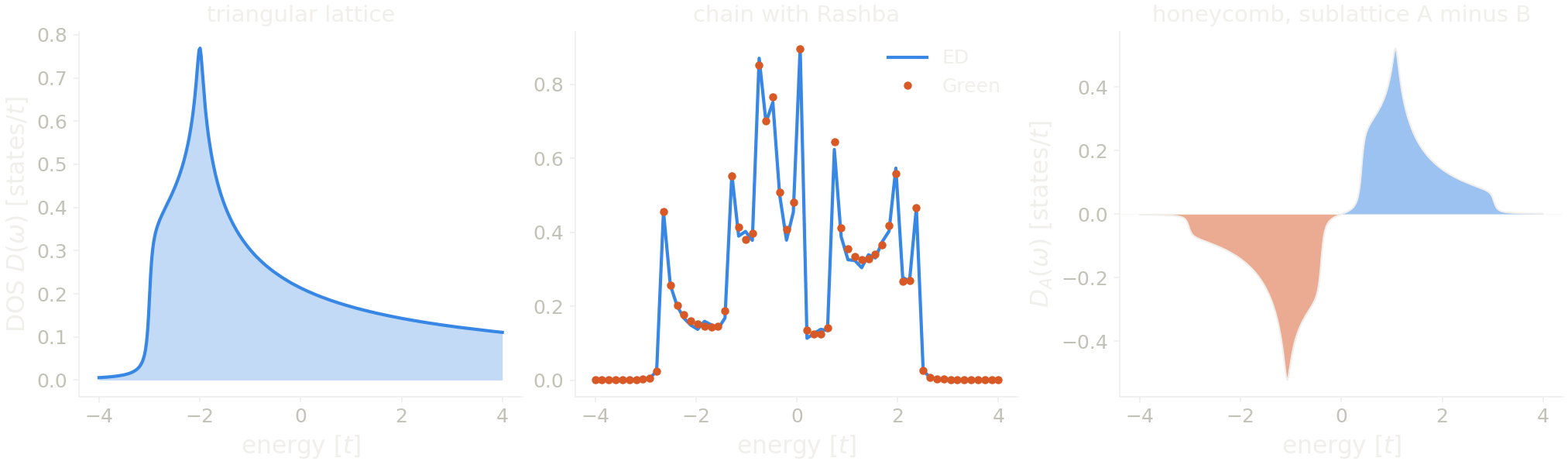
In the left panel, the density of states of the triangular lattice starts at
\(-3t\) and has its van Hove peak at \(-2t\), with a height of \(0.77\). The window
stops at \(4t\), so the integral over the window is \(1.78\) and not \(2\): the
states between \(4t\) and \(6t\) are missing. For this panel we take nk=400 and
delta=0.05, the same broadening as the default nk=100. With the default
k-mesh the curve has small regular ripples on the right of the peak. Each
ripple is a group of k-points of the mesh, which the broadening does not
merge. At nk=400 they are gone, and nk=800 changes the curve by less than
\(10^{-4}\). In the middle panel, the ED (line) and the Green's function (dots) results
fall on top of each other at every energy. In the right panel, the
sublattice-projected density of states is zero for \(|\omega|<0.4\), the gap
of the sublattice imbalance, up to the tails of the broadening. It is
negative below the gap and positive above it, with its largest values,
\(\pm0.52\), at \(\pm 1.08\), the van Hove peaks \(\pm\sqrt{t^2+0.4^2}\) moved by
the gap. Here nk=200 is converged: nk=400 changes the curve by less than
\(10^{-5}\).
Code of this figure (documentation/figures/bands_dos.py)
import numpy as np
import style
from pyqula import geometry

# triangular lattice
g = geometry.triangular_lattice() # get the geometry
h = g.get_hamiltonian()  # get the Hamiltonian
(es,ds) = h.get_dos(nk=400,delta=0.05) # the default broadening, 5/nk at nk=100, on a finer k-mesh

# ED and Green's function on a chain with Rashba spin-orbit coupling
g = geometry.chain()
h = g.get_hamiltonian(tij=[0.5,0.,0.,0.5],has_spin=True)
h.add_rashba(0.7)
energies = np.linspace(-4.,4.0,60)
(e1,d1) = h.get_dos(energies=energies,delta=1e-2,mode="ED",nk=1000)
(e2,d2) = h.get_dos(energies=energies,delta=1e-2,mode="Green")

# sublattice-projected DOS of the honeycomb lattice
g = geometry.honeycomb_lattice()
h = g.get_hamiltonian(has_spin=True)
h.add_sublattice_imbalance(.4)
(es3,ds3) = h.get_dos(operator="sublattice",nk=200,delta=5e-2)

def draw(ax, c):
    ax[0].fill_between(es, ds, color=c.blue, alpha=0.3, lw=0)
    ax[0].plot(es, ds, color=c.blue)
    ax[0].set_title("triangular lattice")
    ax[1].plot(e1, d1, color=c.blue, label="ED")
    ax[1].plot(e2, d2, "o", color=c.orange, ms=4, label="Green")
    ax[1].set_title("chain with Rashba")
    ax[1].legend(loc="upper right")
    ax[2].fill_between(es3, ds3, where=ds3>0, color=c.blue, alpha=0.5, lw=0)
    ax[2].fill_between(es3, ds3, where=ds3<0, color=c.orange, alpha=0.5, lw=0)
    ax[2].plot(es3, ds3, color=c.ink, lw=1)
    ax[2].axhline(0, color=c.ink, lw=0.6, alpha=0.4)
    ax[2].set_title("honeycomb, sublattice A minus B")
    for a in ax: a.set_xlabel("energy [$t$]")
    ax[0].set_ylabel(r"DOS $D(\omega)$ [states/$t$]")
    ax[2].set_ylabel(r"$D_A(\omega)$ [states/$t$]")

style.save(draw, "bands_dos", npanels=3)
See examples/1d/dos_GF/main.py and examples/2d/operator_dos/main.py for
runnable scripts, and
jupyter-notebooks/functionalities/single_particle_hamiltonians/06_operator_resolved_dos.ipynb
for an executed notebook.