Operators
An operator lets us ask a question about each eigenstate: which spin it has, where it is located, in which valley it is. In this page we see the operators that pyqula provides, their definition and their physical meaning.
All of them are obtained with h.get_operator(name), and they are used
through the operator= argument of h.get_bands(), h.get_dos(),
h.get_ldos(), h.get_kdos_bands() and h.get_vev(). For an eigenstate
\(|\Psi_n(\mathbf k)\rangle\) the quantity computed is the expectation value
With h.get_bands() this gives one extra array, the value \(O_n(\mathbf k)\)
of each state, so you can color the band structure with it. With
h.get_dos() each state enters the density of states with weight
\(O_n(\mathbf k)\), so you get, for example, the spin-up minus spin-down
density of states. Operators can also be added and multiplied, and some of
them depend on \(\mathbf k\) or are not even linear, as we see below.
See the executed notebooks
jupyter-notebooks/functionalities/single_particle_hamiltonians/04_state_resolved_bands.ipynb
and 06_operator_resolved_dos.ipynb for operator-resolved band structures
and densities of states.
Spin operators
The simplest operators are the spin operators,
where \(n\) runs over the sites, \(\mu,\nu\) over the two spin states, and \(\sigma_\alpha\) are the Pauli matrices. Note that there is no factor \(1/2\), so the expectation value goes from \(-1\) to \(+1\). They need a spinful Hamiltonian.
from pyqula import geometry
g = geometry.triangular_lattice() # get the geometry
h = g.get_hamiltonian()  # get the Hamiltonian
sx = h.get_operator("sx") # Spin x component
sy = h.get_operator("sy") # Spin y component
sz = h.get_operator("sz") # Spin z component
With h.get_bands(operator=sz) each band carries its spin projection. In a
Zeeman field along \(z\) the two spin bands get \(+1\) and \(-1\); with spin-orbit
coupling the spin changes along the band. The names also work as strings,
operator="sz". In the same way you can resolve by spin the density of
states, the Fermi surface and the momentum-resolved spectral function, which
is what spin-resolved ARPES measures.
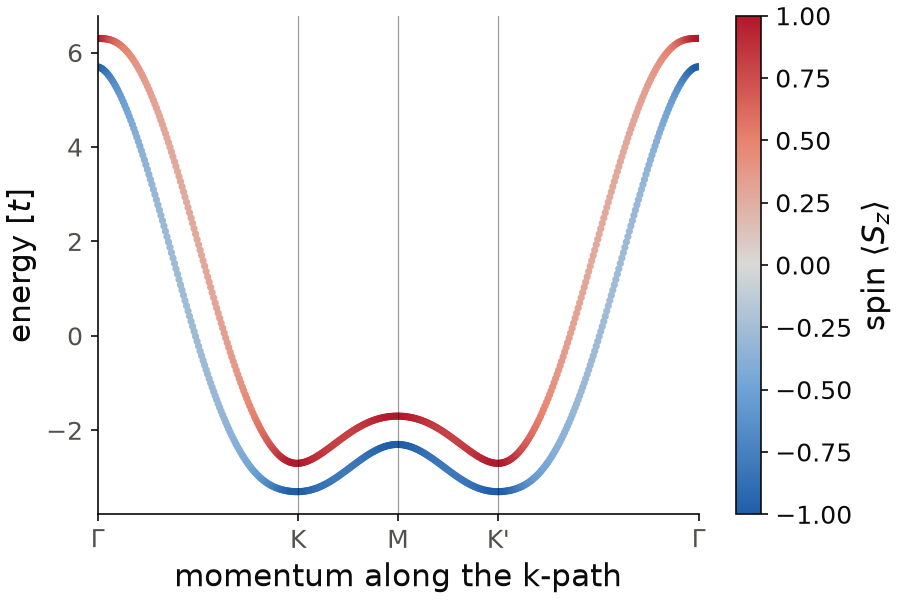
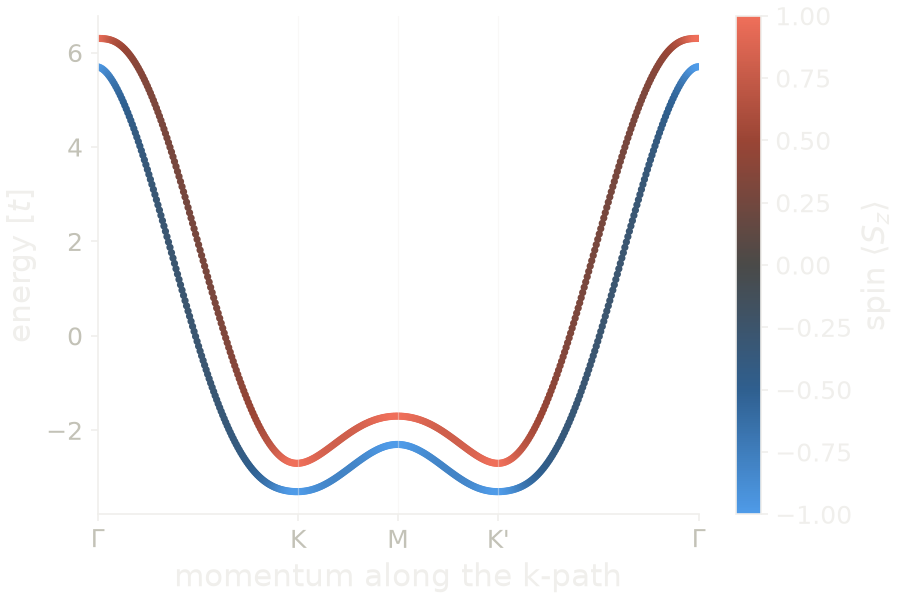
To see the spin change along a band, we add to the snippet a Rashba
coupling \(0.3\) and a Zeeman field \(0.3\) along \(z\), and we color the bands
with the expectation value of sz. At \(\Gamma\) the two bands are split by
\(0.6=2\times0.3\), and their spin is \(\pm1\), as in a pure Zeeman field.
Between \(\Gamma\) and \(K\) the Rashba coupling turns the spin into the plane,
and \(|\langle S_z\rangle|\) goes down to \(0.27\). At \(K\), \(M\) and \(K'\) the two
bands are again polarized along \(z\), with \(\langle S_z\rangle=\pm1.00\).
Code of this figure (documentation/figures/operators_spin.py)
import numpy as np
import style
from pyqula import geometry
g = geometry.triangular_lattice() # get the geometry
h = g.get_hamiltonian()  # get the Hamiltonian
sx = h.get_operator("sx") # Spin x component
sy = h.get_operator("sy") # Spin y component
sz = h.get_operator("sz") # Spin z component
h.add_rashba(0.3) # spin-orbit coupling, rotates the spin along the band
h.add_zeeman([0.,0.,0.3]) # Zeeman field along z
(k,e,s) = h.get_bands(operator=sz) # bands, and S_z of each state

def draw(ax, c):
    sc = ax.scatter(k, e, c=s, s=6, cmap=c.diverging, vmin=-1, vmax=1)
    style.colorbar(sc, ax, r"spin $\langle S_z\rangle$")
    style.kpath(ax, k, [r"$\Gamma$", "K", "M", "K'", r"$\Gamma$"], at=[0,1/3,1/2,2/3,1])
    ax.set_xlabel("momentum along the k-path")
    ax.set_ylabel("energy [$t$]")

style.save(draw, "operators_spin")
See
examples/2d/operator_fermi_surface/main.py for a spin-resolved Fermi
surface, and
jupyter-notebooks/functionalities/spectral_functions/06_operator_momentum_resolved.ipynb
for a spin-resolved spectral function.
Listing the accepted names
The operator argument accepts an operator object, a matrix, a Hamiltonian,
a function of the position, or a name. Other arguments are also chosen by a
name: the initial guess of a mean-field calculation (mf=), the pairing
symmetry (mode= of h.add_pairing()), the labels of the high-symmetry
k-points, and the quantities of h.extract(). If you do not remember a
name, you can print the list:
from pyqula import operatorlist, meanfield, extract
from pyqula.sctk import pairing
from pyqula.kpointstk import labels

print(operatorlist.get_operator_names()) # every name h.get_operator accepts
print(meanfield.get_guess_names())    # every mf= mean-field initialization
print(pairing.get_pairing_modes())    # every h.add_pairing(mode=...) symmetry
print(labels.get_label_names())       # every high-symmetry kpoint label
print(extract.get_extractable_names())# every h.extract(...) quantity
A wrong name raises a ValueError that lists the accepted names.
Location operator
The position operators tell where a state is located in real space,
where \(r^\alpha_n\) is the \(\alpha\) component of the position of site \(n\), and \(s\) runs over the spin. The expectation value is the mean position of the state, \(\langle R_\alpha\rangle = \sum_n r^\alpha_n |\Psi(n)|^2\).
from pyqula import geometry
g = geometry.triangular_lattice() # get the geometry
h = g.get_hamiltonian()  # get the Hamiltonian
x = h.get_operator("xposition") # x component
y = h.get_operator("yposition") # y component
z = h.get_operator("zposition") # z component
In a ribbon periodic along \(x\), the value of y says where across the
width a state is. With h.get_bands(operator=y) the states at the two edges
get opposite values, and the bulk states are close to the center. This is
the continuous version of the bulk-edge operator below.
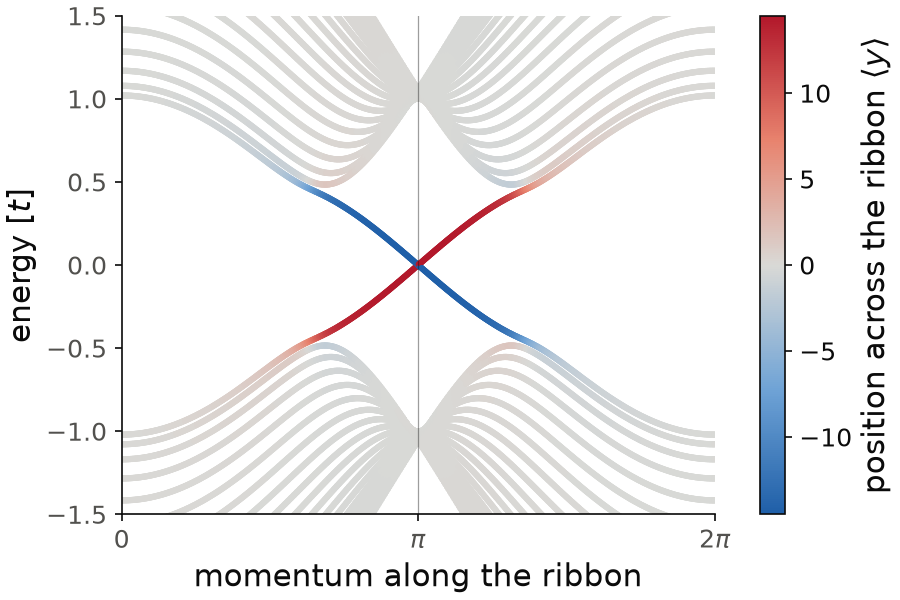
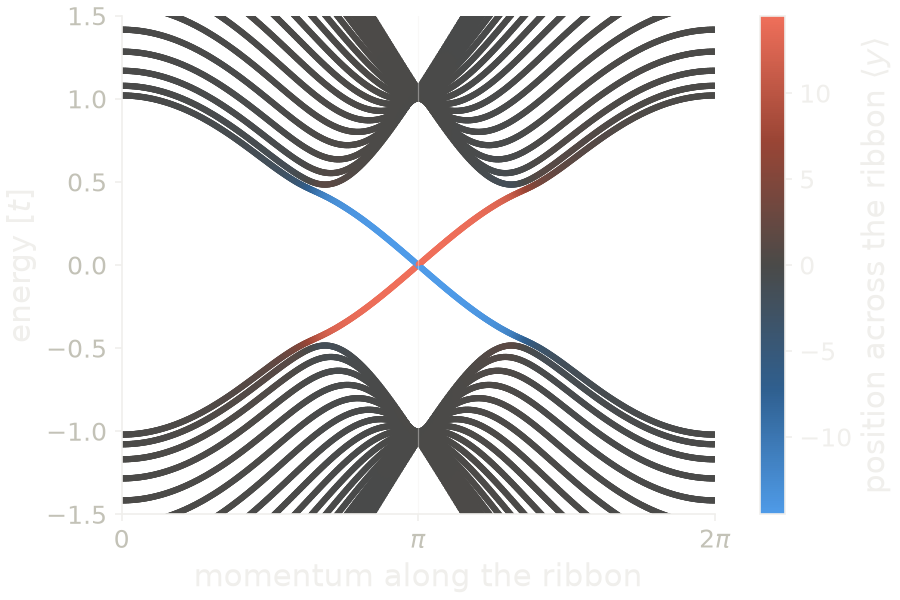
The triangular lattice of the snippet is periodic in both directions, so
for the figure we use a zigzag honeycomb ribbon, with a Haldane coupling
\(0.1\) to have states at the edges, and we color the bands with the
expectation value of yposition. The ribbon goes from \(y=-14.5\) to
\(y=14.5\). The bulk bands are white, with \(\langle y\rangle\) close to zero,
and they have a gap between \(-0.48\) and \(0.48\). Inside the gap there are two
bands that cross at \(k=\pi\): the red one has \(\langle y\rangle\approx 14\)
and the blue one \(\langle y\rangle\approx -14\), so they live at the two
opposite edges. They also have opposite velocities: these are the chiral
edge states of the Haldane model.
Code of this figure (documentation/figures/operators_position.py)
import style
from pyqula import geometry
g = geometry.honeycomb_zigzag_ribbon() # ribbon periodic along x
h = g.get_hamiltonian()  # get the Hamiltonian
h.add_haldane(0.1) # Haldane coupling, gives chiral states at the edges
y = h.get_operator("yposition") # y component
(k,e,yk) = h.get_bands(operator=y) # bands, and <y> of each state
W = g.y.max() # half width of the ribbon

def draw(ax, c):
    sc = ax.scatter(k, e, c=yk, s=4, cmap=c.diverging, vmin=-W, vmax=W)
    style.colorbar(sc, ax, r"position across the ribbon $\langle y\rangle$")
    style.kpath(ax, k, ["0", r"$\pi$", r"$2\pi$"])
    ax.set_xlabel("momentum along the ribbon")
    ax.set_ylabel("energy [$t$]")
    ax.set_ylim(-1.5, 1.5)

style.save(draw, "operators_position")
Bulk-edge operator
To know if a state sits at the edge or in the bulk, we use the edge and the bulk operators,
The expectation value of \(\hat E\) is the weight of the state on the edge sites, between 0 and 1.
from pyqula import geometry
g = geometry.honeycomb_zigzag_ribbon() # get the geometry
h = g.get_hamiltonian()  # get the Hamiltonian
b = h.get_operator("bulk") # bulk operator
e = h.get_operator("edge") # edge operator
The edge sites are defined by their position. In a ribbon they are the sites
in the outer 10% of the width on each side. In a finite island they are the
sites in the outer part of the radius, and in a two-dimensional multilayer
the outer layers along \(z\). In the zigzag ribbon above,
h.get_bands(operator=e) gives a weight close to 1 for the flat band at zero
energy, the zigzag edge states, and a small weight for the dispersive bulk
bands. So this is a quick way to find in-gap edge states in a band
structure.
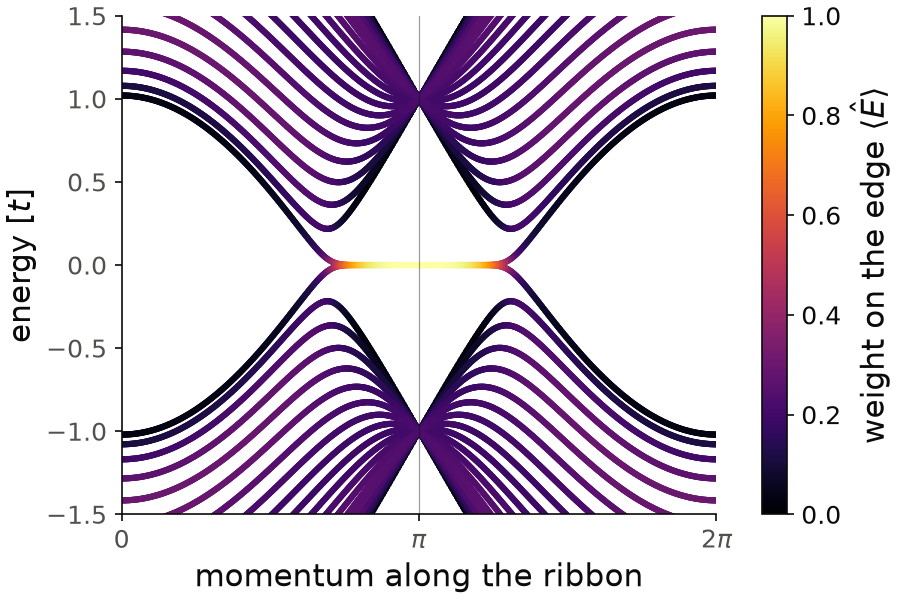
The flat band at zero energy is bright: its weight on the edge grows from about \(0.5\), where it joins the bulk bands, to \(1.00\) at \(k=\pi\). The bulk bands are dark, with weights below \(0.30\). The edge sites are \(20\%\) of the ribbon, so a state spread over the whole ribbon has a weight close to \(0.2\), and this is the typical value of the bulk bands.
Code of this figure (documentation/figures/operators_edge.py)
import numpy as np
import style
from pyqula import geometry
g = geometry.honeycomb_zigzag_ribbon() # get the geometry
h = g.get_hamiltonian()  # get the Hamiltonian
b = h.get_operator("bulk") # bulk operator
e = h.get_operator("edge") # edge operator
(k,en,w) = h.get_bands(operator=e) # bands, and edge weight of each state

def draw(ax, c):
    i = np.argsort(w) # draw the edge states on top
    sc = ax.scatter(k[i], en[i], c=w[i], s=4, cmap=c.cmap, vmin=0, vmax=1)
    style.colorbar(sc, ax, r"weight on the edge $\langle \hat E\rangle$")
    style.kpath(ax, k, ["0", r"$\pi$", r"$2\pi$"])
    ax.set_xlabel("momentum along the ribbon")
    ax.set_ylabel("energy [$t$]")
    ax.set_ylim(-1.5, 1.5)

style.save(draw, "operators_edge")
Valley operator
In honeycomb lattices, and also in aligned and twisted multilayers, the
low-energy states sit in two valleys, around \(K\) and \(K'\). The valley
operator \(\tau_z\) tells in which valley a state is. It is obtained with
h.get_operator("valley"), and it is a second-neighbor hopping of the
Haldane type,
where the sum goes over second neighbors, \(\nu_{ij}=\pm1\) for a clockwise or anticlockwise path from \(j\) to \(i\), and \(\eta_i=\pm1\) for sublattice A or B. The factor \(\eta_i\) is what makes it different from the Haldane term. The Haldane term is a mass, with opposite sign on the two sublattices. This "modified Haldane" coupling has the same sign on both sublattices and opposite sign in the two valleys. The operator is normalized so that its expectation value is close to \(+1\) in one valley and \(-1\) in the other.
from pyqula import geometry
g = geometry.honeycomb_zigzag_ribbon() # get the geometry
h = g.get_hamiltonian()  # get the Hamiltonian
vall = h.get_operator("valley") # valley operator
With h.get_bands(operator=vall) the states around \(K\) and around \(K'\) get
opposite signs. This is most useful in a supercell or a moiré system, where
the bands of the two valleys are folded on top of each other, and the valley
operator is the way to separate them.
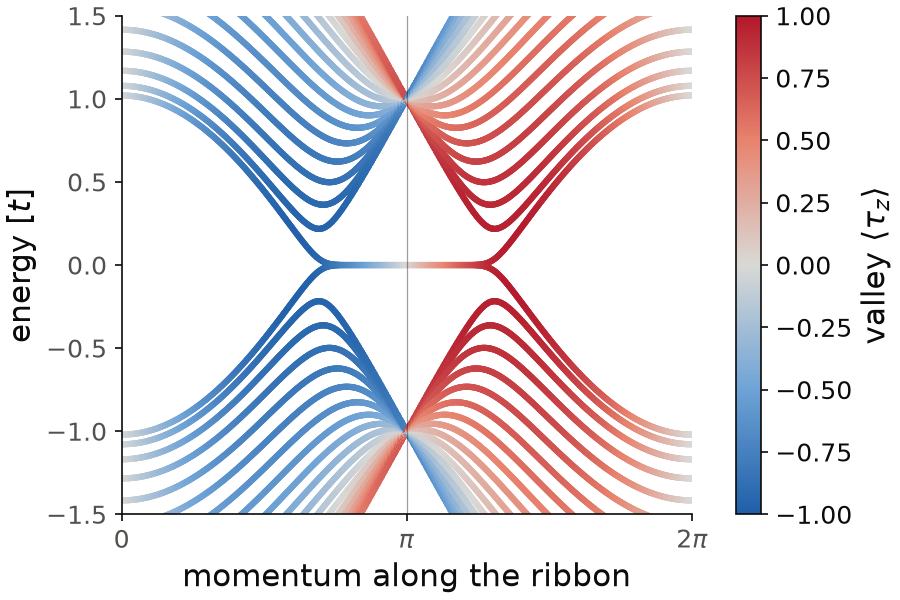
In the zigzag ribbon the two valleys are projected on two different momenta along the ribbon, one on each side of \(k=\pi\). The bands on the left are blue and the ones on the right are red, with \(\langle\tau_z\rangle\) up to \(\pm0.98\). The flat edge band goes from blue to red through white at \(k=\pi\), where the edge state is an equal mix of the two valleys.
Code of this figure (documentation/figures/operators_valley.py)
import style
from pyqula import geometry
g = geometry.honeycomb_zigzag_ribbon() # get the geometry
h = g.get_hamiltonian()  # get the Hamiltonian
vall = h.get_operator("valley") # valley operator
(k,e,v) = h.get_bands(operator=vall) # bands, and valley of each state

def draw(ax, c):
    sc = ax.scatter(k, e, c=v, s=4, cmap=c.diverging, vmin=-1, vmax=1)
    style.colorbar(sc, ax, r"valley $\langle \tau_z\rangle$")
    style.kpath(ax, k, ["0", r"$\pi$", r"$2\pi$"])
    ax.set_xlabel("momentum along the ribbon")
    ax.set_ylabel("energy [$t$]")
    ax.set_ylim(-1.5, 1.5)

style.save(draw, "operators_valley")
See
examples/1d/valley_operator/main.py for the valley-resolved bands of a
zigzag ribbon, examples/2d/valley_bands/main.py for a honeycomb supercell,
and
jupyter-notebooks/functionalities/single_particle_hamiltonians/04_state_resolved_bands.ipynb.
In-plane valley operators
The valley operator above is the \(z\) component of a valley pseudospin. We now
see the two other components, \(\tau_x\) and \(\tau_y\), with
h.get_operator("valley_x") and h.get_operator("valley_y"). Together they
give the full valley vector \((\tau_x,\tau_y,\tau_z)\), in the same way as
\((S_x,S_y,S_z)\) for the spin. While \(\tau_z\) measures in which valley a state
is, \(\tau_x\) and \(\tau_y\) measure the coherent mixing of the two valleys, the
intervalley coherence, which is what a Kekulé bond order or an
intervalley-coherent state has. They are built from a Kekulé coupling, which
connects \(K\) and \(K'\), averaged over the three Kekulé patterns so that the
operator has the \(C_3\) symmetry of the lattice around every site.
from pyqula import geometry
g = geometry.honeycomb_lattice().supercell(3) # Kekule-commensurate cell
h = g.get_hamiltonian(has_spin=False)  # get the Hamiltonian
taux = h.get_operator("valley_x") # tau_x
tauy = h.get_operator("valley_y") # tau_y
Both need a honeycomb-like lattice with a sublattice index. In a periodic
system the Kekulé pattern must fit in the unit cell, so we need a \(3\times3\)
supercell (or a multiple of 3) of the primitive cell. This is why we use
supercell(3) above. A finite flake has no such condition.
A single vacancy in a honeycomb flake scatters electrons between the two valleys, and creates a vortex of the in-plane valley pseudospin around it. We compute \((\tau_x,\tau_y)\) on every site:
from pyqula import islands
from pyqula import spectrum
g = islands.get_geometry(name="honeycomb",n=8,nedges=6)
gv = g.remove(g.get_central()[0]) # flake with a single vacancy
hv = gv.get_hamiltonian(has_spin=False)
dvx = spectrum.real_space_vev(hv,operator=hv.get_operator("valley_x"))
dvy = spectrum.real_space_vev(hv,operator=hv.get_operator("valley_y"))
dvx and dvy contain the expectation value of each component on every
site, summed over the occupied states. If you draw \((\tau_x,\tau_y)\) as an
arrow on each site, the largest arrows, up to \(0.29\), are at the edges of
the flake, because the zigzag edges have their own valley texture. Around
the vacancy the arrows are up to \(0.20\), and they wind once: when we go
counterclockwise around the vacancy, on a ring of radius 1 to 3, the arrow
turns once clockwise, a winding number of \(-1\). To keep only the part created by the
vacancy, we compute the same quantity on the pristine flake and subtract it,
as examples/0d/valley_vortex_vacancy/main.py does. After this the arrows at
the edges are below \(0.002\), and the winding \(-1\) around the vacancy stays.
The valley vector can also enter the Hamiltonian. h.add_valley_exchange(v),
with \(\vec v=(v_x,v_y,v_z)\), adds the term
a valley Zeeman field, in the same way as h.add_exchange() for the spin:
from pyqula import geometry
g = geometry.honeycomb_lattice().supercell(3) # Kekule-commensurate cell
h = g.get_hamiltonian(has_spin=False)
h.add_valley_exchange([0.1,0.05,0.2]) # (vx,vy,vz)
See examples/0d/valley_vortex_vacancy/main.py and
examples/2d/valley_vortex/main.py for runnable scripts of the vacancy
vortex.
Nambu operators
In a superconductor the Hamiltonian is written in the Nambu basis, with an
electron and a hole component for each site and spin (see
Superconductivity). The operators "electron" and
"hole" project on these two components,
The Hamiltonian must already be in the Nambu basis, so some pairing must be
added first, or h.setup_nambu_spinor() must be called. Otherwise the hole
projector raises an error.
from pyqula import geometry
g = geometry.triangular_lattice() # get the geometry
h = g.get_hamiltonian()  # get the Hamiltonian
h.add_swave(0.2) # add pairing, doubling the basis into Nambu space
electron = h.get_operator("electron") # electron component
hole = h.get_operator("hole") # hole component
(k,e,c) = h.get_bands(operator=electron) # electron weight of each state
For a Bogoliubov quasiparticle \(\gamma = u\, c + v\, c^\dagger\) the electron weight is \(|u|^2\). Far from the Fermi energy a state is a pure electron (\(|u|^2=1\)) or a pure hole (\(|u|^2=0\)). Only close to the gap do the two mix, and exactly at the Fermi momentum \(|u|^2=|v|^2=1/2\). So the electron weight separates the physical band structure from its hole copy, and it is the weight used to obtain the electron spectral function from the full Bogoliubov-de Gennes spectrum.
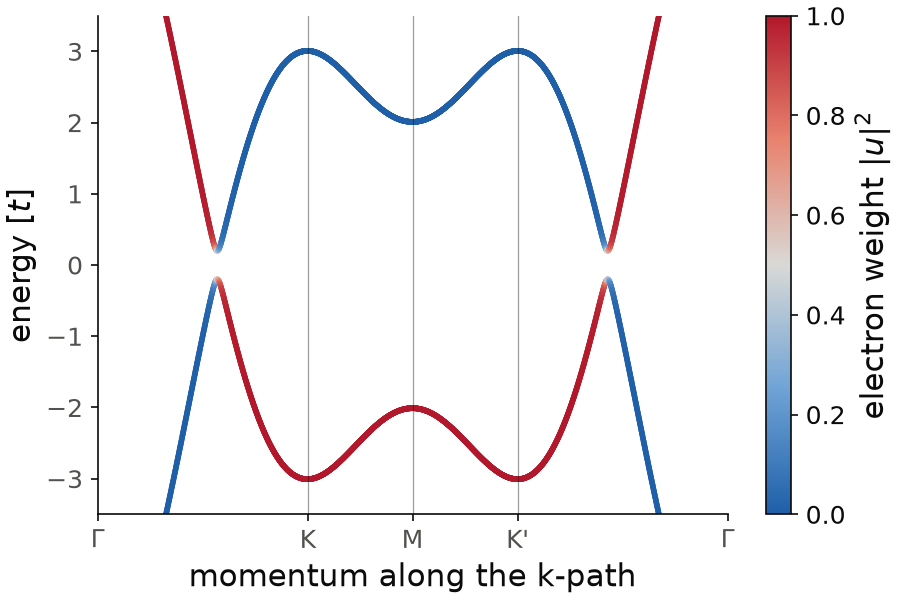
The red band is the band of the triangular lattice, a pure electron with
\(|u|^2=1\), with its minimum \(-3\) at \(K\) and \(K'\). The blue band is its hole
copy, the same band with the opposite energy, with \(|u|^2=0\). They meet at
the Fermi momentum, where the pairing opens a gap between \(-0.2\) and \(0.2\),
so \(2\Delta=0.4\), and only there the color goes through white,
\(|u|^2=1/2\). We use nk=1500 k-points instead of the default, because
the band is steep where it crosses the Fermi energy.
Code of this figure (documentation/figures/operators_nambu.py)
import numpy as np
import style
from pyqula import geometry
g = geometry.triangular_lattice() # get the geometry
h = g.get_hamiltonian()  # get the Hamiltonian
h.add_swave(0.2) # add pairing, doubling the basis into Nambu space
electron = h.get_operator("electron") # electron component
hole = h.get_operator("hole") # hole component
(k,e,c) = h.get_bands(operator=electron,nk=1500) # electron weight of each state

def draw(ax, cl):
    sc = ax.scatter(k, e, c=c, s=3, cmap=cl.diverging, vmin=0, vmax=1)
    style.colorbar(sc, ax, r"electron weight $|u|^2$")
    style.kpath(ax, k, [r"$\Gamma$", "K", "M", "K'", r"$\Gamma$"], at=[0,1/3,1/2,2/3,1])
    ax.set_xlabel("momentum along the k-path")
    ax.set_ylabel("energy [$t$]")
    ax.set_ylim(-3.5, 3.5)

style.save(draw, "operators_nambu")
Berry curvature operator
The Berry curvature operator is an example of an operator that depends on \(\mathbf k\). It acts on an eigenstate as
where \(\Omega(\mathbf k,\omega)\) is the Berry curvature at momentum
\(\mathbf k\), computed from the Green's function at the energy
\(\omega=\epsilon_n(\mathbf k)\) of the state, with a broadening delta
(0.1 by default). It is obtained with h.get_operator("berry"), and it is
defined only for two-dimensional Hamiltonians. With
h.get_bands(operator="berry") you see which states of a Chern insulator
carry the Berry curvature, usually the states close to the gap edge. The
integral of the Berry curvature of the occupied states over the Brillouin
zone is the Chern number (see
Topological invariants).
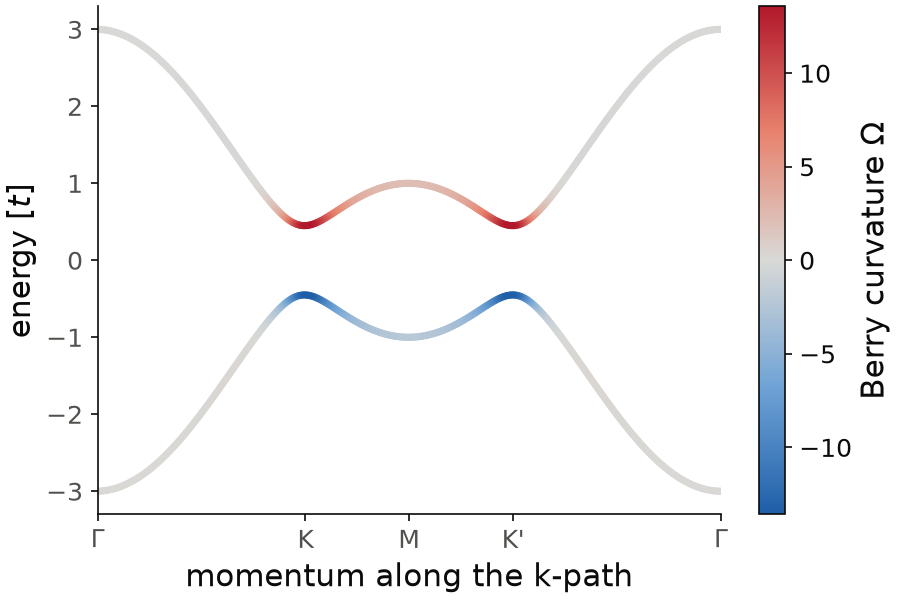
Here we take the spinless honeycomb lattice with a Haldane coupling \(0.1\),
h.add_haldane(0.1), a Chern insulator with Chern number \(1\), and color its
bands with operator="berry". The Berry curvature is large only close to
the gap edges at \(K\) and \(K'\), at energies \(\pm0.45\), where it reaches
\(\pm13.6\), and it is zero at \(\Gamma\). It has the same sign at \(K\) and at
\(K'\), which is why the Chern number is not zero, and the opposite sign in
the two bands.
Code of this figure (documentation/figures/operators_berry.py)
import numpy as np
import style
from pyqula import geometry
g = geometry.honeycomb_lattice() # honeycomb lattice
h = g.get_hamiltonian(has_spin=False) # spinless Hamiltonian
h.add_haldane(0.1) # Haldane coupling, a Chern insulator
(k,e,b) = h.get_bands(operator="berry") # bands, and Berry curvature of each state
bmax = np.abs(b).max()

def draw(ax, c):
    i = np.argsort(np.abs(b)) # draw the largest curvature on top
    sc = ax.scatter(k[i], e[i], c=b[i], s=6, cmap=c.diverging, vmin=-bmax, vmax=bmax)
    style.colorbar(sc, ax, r"Berry curvature $\Omega$")
    ax.set_xticks(np.array([0,1/3,1/2,2/3,1])*k.max(),
                  [r"$\Gamma$", "K", "M", "K'", r"$\Gamma$"])
    ax.set_xlim(0, k.max())
    ax.set_xlabel("momentum along the k-path")
    ax.set_ylabel("energy [$t$]")

style.save(draw, "operators_berry")
Inverse participation ratio operator
All the operators above are linear, meaning that
The inverse participation ratio (IPR) is an operator that is not linear. It is defined as
where \(i\) runs over all the components of the state (sites and spin). Its expectation value \(\sum_i |\langle i|\Psi\rangle|^4\) is 1 for a state on a single site, and \(1/N\) for a state spread equally over \(N\) sites. So a large value means a localized state, for example an impurity state or an edge state.
from pyqula import geometry
g = geometry.honeycomb_zigzag_ribbon() # get the geometry
h = g.get_hamiltonian()  # get the Hamiltonian
h.add_onsite(0.3) # add a uniform onsite energy
ipr = h.get_operator("IPR") # IPR operator
The onsite energy 0.3 only shifts the bands rigidly. In this zigzag ribbon, h.get_bands(operator=ipr) gives the flat edge
states an IPR more than ten times larger than the bulk bands: close to the
zone boundary the edge states live on a single site of the edge.
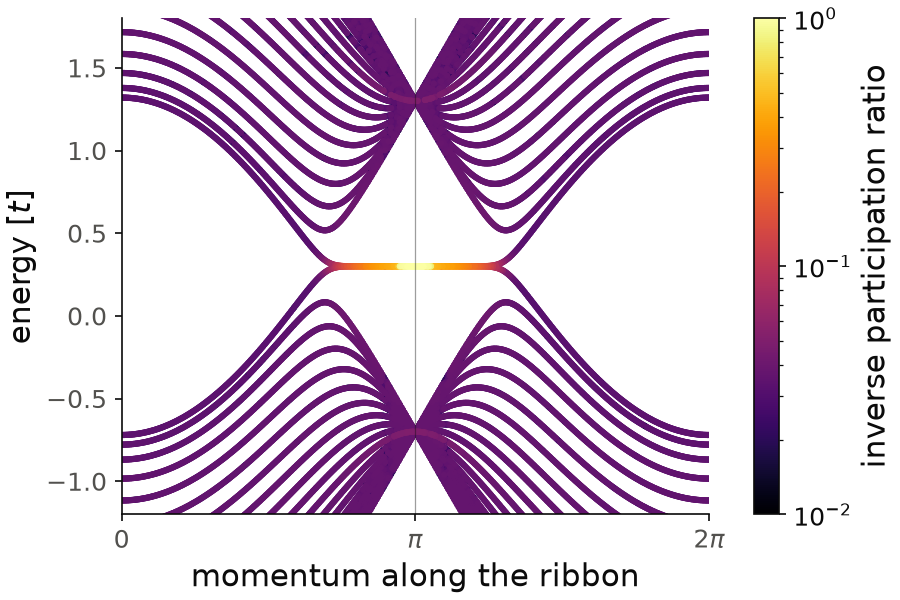
The color scale is logarithmic. The bulk bands have an IPR between \(0.02\) and \(0.05\), close to \(1/40=0.025\), the value for a state spread over the 40 sites of the ribbon. The flat edge band at \(E=0.3\) goes up to \(1.00\) close to \(k=\pi\). Some points of this band have \(0.5\) instead of \(1\): the two edge states at the same energy are degenerate, and the diagonalization can mix them into a state that lives on both edges.
Code of this figure (documentation/figures/operators_ipr.py)
import numpy as np
from matplotlib.colors import LogNorm
import style
from pyqula import geometry
g = geometry.honeycomb_zigzag_ribbon() # get the geometry
h = g.get_hamiltonian()  # get the Hamiltonian
h.add_onsite(0.3) # add a uniform onsite energy
ipr = h.get_operator("IPR") # IPR operator
(k,e,p) = h.get_bands(operator=ipr) # bands, and IPR of each state

def draw(ax, c):
    i = np.argsort(p) # draw the localized states on top
    sc = ax.scatter(k[i], e[i], c=p[i], s=4, cmap=c.cmap,
                    norm=LogNorm(vmin=1e-2, vmax=1)) # logarithmic color scale
    style.colorbar(sc, ax, "inverse participation ratio")
    style.kpath(ax, k, ["0", r"$\pi$", r"$2\pi$"])
    ax.set_xlabel("momentum along the ribbon")
    ax.set_ylabel("energy [$t$]")
    ax.set_ylim(-1.2, 1.8)

style.save(draw, "operators_ipr")